 Needs owners2 of 5 so far
9.01 press
$439
was $469
6% off
No owners yet. Here's everything else.
0 of 5 owners · 5 more and the score goes live.
Paid link. We may earn a commission at no extra cost to you. How this works
Price checked Nov 7 on the official US store.
Reviewers earn Spools (site points) for any review, good or bad. Spools never change a score.
No owner reviews yet. If you own a Neptune 4 Max, yours will be the first, and it starts this printer's ranking.
No verified owners yet. Post a photo of yours with your code and be the first on the wall.
Normal price. Now $394. About its usual $376. Tracked since Nov 2025.
| Week of | Lowest price | vs median | Source |
|---|---|---|---|
| Nov 17, 2025 | $359.99 | +$1 | store check |
| Nov 24, 2025 | $359.99 | +$1 | store check |
| Dec 1, 2025 | $359 | $0 | store check |
| Dec 8, 2025 | $359 | $0 | store check |
| Dec 15, 2025 | $359 | $0 | store check |
| Dec 22, 2025 | $359 | $0 | store check |
| Dec 29, 2025 | $359 | $0 | store check |
| Jan 5, 2026 | $419 | +$60 | store check |
| Jan 12, 2026 | $359 | $0 | store check |
| Jan 19, 2026 | $359 | $0 | store check |
| Jan 26, 2026 | $359 | $0 | store check |
| Feb 2, 2026 | $359 | $0 | store check |
| Feb 9, 2026 | $359 | $0 | store check |
| Feb 16, 2026 | $359 | $0 | store check |
| Feb 23, 2026 | $359 | $0 | store check |
| Mar 2, 2026 | $359 | $0 | store check |
| Mar 9, 2026 | $359 | $0 | store check |
| Mar 16, 2026 | $359 | $0 | store check |
| Mar 23, 2026 | $359 | $0 | store check |
| Mar 30, 2026 | $359 | $0 | store check |
| Apr 6, 2026 | $359 | $0 | store check |
| Apr 13, 2026 | $389 | +$30 | store check |
| Apr 20, 2026 | $389 | +$30 | store check |
| Apr 27, 2026 | $389 | +$30 | store check |
| May 4, 2026 | $359 | $0 | store check |
| May 11, 2026 | $359 | $0 | store check |
| May 18, 2026 | $359 | $0 | store check |
| May 25, 2026 | $359 | $0 | store check |
| Jun 1, 2026 | $359 | $0 | store check |
| Jun 8, 2026 | $389 | +$30 | store check |
| Jun 15, 2026 | $389 | +$30 | store check |
| Jun 22, 2026 | $389 | +$30 | store check |
| Jun 29, 2026 | $389 | +$30 | store check |
| Jul 6, 2026 | $389 | +$30 | store check |
| Jul 13, 2026 | $389 | +$30 | store check |
| Jul 20, 2026 | $389 | +$30 | store check |
| Jul 27, 2026 | $389 | +$30 | store check |
| Aug 3, 2026 | $389 | +$30 | store check |
| Aug 10, 2026 | $389 | +$30 | store check |
| Aug 17, 2026 | $359 | $0 | store check |
| Aug 24, 2026 | $359 | $0 | store check |
| Aug 31, 2026 | $359 | $0 | store check |
| Sep 7, 2026 | $359 | $0 | store check |
| Sep 14, 2026 | $389 | +$30 | store check |
| Sep 21, 2026 | $389 | +$30 | store check |
| Sep 28, 2026 | $359 | $0 | store check |
| Oct 5, 2026 | $359 | $0 | store check |
| Oct 12, 2026 | $389 | +$30 | store check |
| Oct 19, 2026 | $359 | $0 | store check |
| Oct 26, 2026 | $359 | $0 | store check |
| Nov 2, 2026 | $359 | $0 | store check |
| Nov 9, 2026 | $394 | +$35 | store check |
| Nov 16, 2026 | $394 | +$35 | store check |
From brand advisories, owner forums and reviews, with sources on each. Newest first. Tap one for what happens and what fixes it.
Like the rest of the Neptune 4 line, the Neptune 4 Max runs a modified Klipper that cannot be updated from upstream, and owners who use the Fluidd update buttons can end up with a printer that will not start. Elegoo's wiki tells owners not to update through Fluidd.
What fixes it: Update only with Elegoo's USB packages. Recover a broken unit by reflashing the eMMC image for the correct model and revision.
From public reports: tomshardware.com, klipper.discourse.group, printer-hub.com · Confirm or add a fix
Reviewers and owners report that the Neptune 4 Max does not always keep the saved nozzle-to-bed distance, so first layers change between prints. Tom's Hardware had to set the Z height through Klipper's web interface by hand on the 4 Max. Probe thermal drift, over-tight wheels or Z nut screws, and bed springs that sag over time add to it.
What fixes it: Calibrate Z offset with the bed heat-soaked (about 20 minutes at 60 °C), set it only from the printer's screen, check the eccentric wheels and Z nut screws are not over-tightened, and confirm the mesh profile loads in the start G-code.
From public reports: wiki.elegoo.com, tomshardware.com, printer-hub.com · Confirm or add a fix
Owners find play in the Neptune 4 Max bed carriage, which shows up as layer artifacts and inconsistent first layers. Elegoo attributes it to unadjusted eccentric wheels, Y extrusions that are not parallel, or a deformed slider plate, and has an official wiki page on it.
What fixes it: Adjust the eccentric nuts until the bed has no rock but still rolls freely. If more than two wheels stay loose, check the Y rails for parallelism or ask Elegoo for a replacement slider plate.
From public reports: wiki.elegoo.com, printer-hub.com · Confirm or add a fix
The Neptune 4 Max has no physical X/Y endstops, and units can keep driving into the frame during homing with a loud grinding sound. Tom's Hardware heard the 4 Max ram its stops on early firmware and said Elegoo updates mostly sorted it out. Printer Hub's roundup points to belt tension as the usual cause, and Elegoo has a wiki page for motors that keep crushing while homing.
What fixes it: Update to current Elegoo firmware, set belt tension per Elegoo's guide, and follow Elegoo's troubleshooting page for motors that keep crushing while homing.
From public reports: wiki.elegoo.com, tomshardware.com, printer-hub.com · Confirm or add a fix
On the Neptune 4 Max, the mainboard and screen firmware must be a matched pair for the right hardware revision, and the fix pack for one revision can brick the other. Symptoms include the screen stuck on the loading screen, a blank mainboard firmware version, or the printer reporting itself as a different Neptune 4 model. Elegoo has an official wiki page for the stuck loading screen on the 4 Plus and 4 Max.
What fixes it: Identify the revision first, then flash the matching fix pack, mainboard and screen firmware from Elegoo. If the printer reports the wrong model after flashing an eMMC image, Elegoo support has supplied model-specific update files.
From public reports: wiki.elegoo.com, github.com, printer-hub.com · Confirm or add a fix
The auxiliary fan bar on the Neptune 4 Max gantry is very loud and has only a physical on/off switch. Tom's Hardware called it way too noisy for the speeds the printer actually runs. Owners report it can chill the bed if run during heat-up, and with PETG the extra cooling can lift edges that then catch on the fan.
What fixes it: Leave the auxiliary fan off; Tom's Hardware says the printer works fine without it. Owners turn it off for PETG and keep it off until the bed is at temperature.
From public reports: tomshardware.com, printer-hub.com · Confirm or add a fix
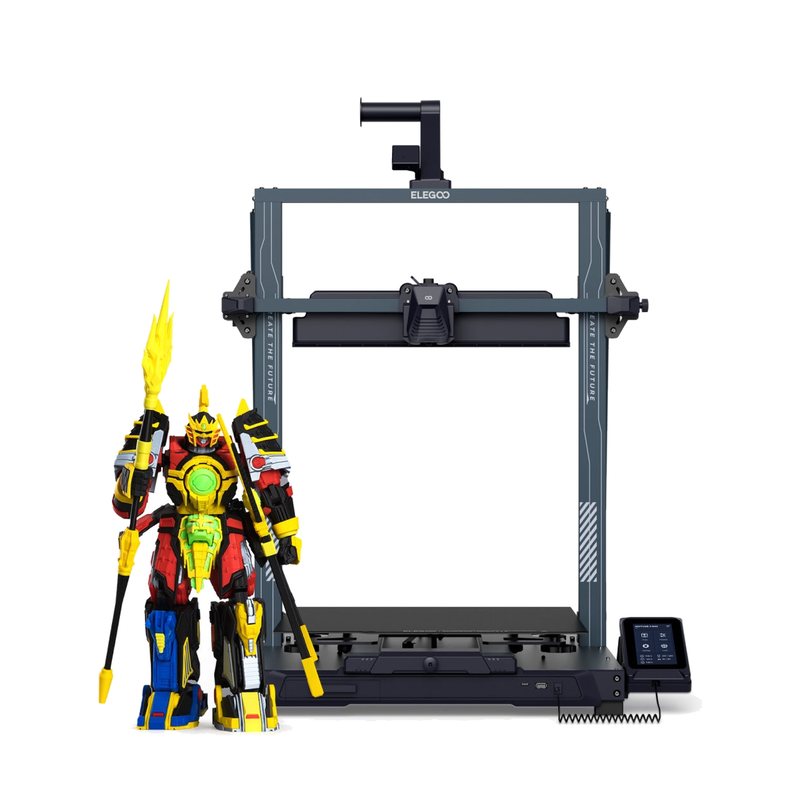
Elegoo's biggest Neptune, with a 420 × 420 × 480 mm volume, Klipper firmware and 8000 mm/s² rated acceleration. It suits budget buyers who need large single-color prints like helmets and props and have room for a big bed slinger.
Needs owners2 of 5 so far
9.01 press
 Needs owners2 of 5 so far
No press
A slightly faster but frustratingly buggy refresh of the Neptune 3 Max.
Read the full review on Tom's Hardware · by Denise Bertacchi
A capable budget large-format printer with quirks that needs close supervision, making newer printers at similar prices easier to recommend.
Read the full review on TechRadar · by Alastair Jennings