 9.4from 8 owners · early
9.02 press
$589
was $649
9% off
Owners like it. Good time to buy.
Early read. Firms up at 25 owners.
Paid link. We may earn a commission at no extra cost to you. How this works
Price checked Nov 7 on the official US store.
Rate yoursReviewers earn Spools (site points) for any review, good or bad. Spools never change a score.
prints flawlessly and preforms as expected. load the file slice it hit print and relax!
Filaments sit out in the elements. unloading have to do manually small build volume could be bigger for me.
Owned 6 to 12 months · Biggest problem: Snap orca
Owned 6 to 12 months · Biggest problem: colors not matching from slicer to printer
Owned less than a month · Biggest problem: Printer doesn't auto unload.Printer doesn't recognise Polymaker filaments when choosen as a machine filament.Printer must be reconncted everytime a slicer is opened.Snapmaker Orca is an unpolished turd compared to Orca and Bambu Studio.
Owned 1 to 6 months · Biggest problem: Auto feeder not feeding filament all the way throwing error. And Petg dragging in the auto feeder causing failed prints.
Owned 1 to 6 months · Biggest problem: Noise
Fast, works out of the box, minimal maintenance needed so far.
Top cover is extra, and is noisy without it.
Owned 6 to 12 months · Biggest problem: No heated chamber = no engineering filament
Owned 6 to 12 months · Biggest problem: Malfunctioning auto feeder Replaced under warranty within 1 week
The print quality is good, with little waste.
The slicer is terrible. Dock anomolies always reported.
Owned 1 to 6 months · Biggest problem: Had an issue with initial software update. It kept stalling on extruder 4.
Owned 1 to 2 years
Owned 1 to 6 months · Biggest problem: Blob on one nozzle.
Owned 6 to 12 months · Biggest problem: Occasional clogged nozzle. It would be nice to have an upgrade to feed straight from a filament dryer; I run 4 machines so swapping 16 spools between prints to wait for them to dry is not practical
Owned 1 to 6 months · Biggest problem: Filament feeding on toolhead 3… really the only reason it’s not higher.
Owned 1 to 2 years · Biggest problem: filament feed error and very slow filament spool changes
No verified owners yet. Post a photo of yours with your code and be the first on the wall.
Good time to buy. Now $699. At or near the lowest price we have tracked. Tracked since Nov 2025.
| Week of | Lowest price | vs median | Source |
|---|---|---|---|
| Nov 17, 2025 | $849 | $0 | store check |
| Nov 24, 2025 | $849 | $0 | store check |
| Dec 1, 2025 | $849 | $0 | store check |
| Dec 8, 2025 | $849 | $0 | store check |
| Dec 15, 2025 | $849 | $0 | store check |
| Dec 22, 2025 | $849 | $0 | store check |
| Dec 29, 2025 | $849 | $0 | store check |
| Jan 5, 2026 | $849 | $0 | store check |
| Jan 12, 2026 | $849 | $0 | store check |
| Jan 19, 2026 | $849 | $0 | store check |
| Jan 26, 2026 | $849 | $0 | store check |
| Feb 2, 2026 | $849 | $0 | store check |
| Feb 9, 2026 | $849 | $0 | store check |
| Feb 16, 2026 | $849 | $0 | store check |
| Feb 23, 2026 | $849 | $0 | store check |
| Mar 2, 2026 | $849 | $0 | store check |
| Mar 9, 2026 | $849 | $0 | store check |
| Mar 16, 2026 | $849 | $0 | store check |
| Mar 23, 2026 | $849 | $0 | store check |
| Mar 30, 2026 | $849 | $0 | store check |
| Apr 6, 2026 | $849 | $0 | store check |
| Apr 13, 2026 | $849 | $0 | store check |
| Apr 20, 2026 | $899 | +$50 | store check |
| Apr 27, 2026 | $899 | +$50 | store check |
| May 4, 2026 | $899 | +$50 | store check |
| May 11, 2026 | $899 | +$50 | store check |
| May 18, 2026 | $899 | +$50 | store check |
| May 25, 2026 | $899 | +$50 | store check |
| Jun 1, 2026 | $899 | +$50 | store check |
| Jun 8, 2026 | $899 | +$50 | store check |
| Jun 15, 2026 | $899 | +$50 | store check |
| Jun 22, 2026 | $849 | $0 | store check |
| Jun 29, 2026 | $849 | $0 | store check |
| Jul 6, 2026 | $849 | $0 | store check |
| Jul 13, 2026 | $849 | $0 | store check |
| Jul 20, 2026 | $899 | +$50 | store check |
| Jul 27, 2026 | $899 | +$50 | store check |
| Aug 3, 2026 | $899 | +$50 | store check |
| Aug 10, 2026 | $849 | $0 | store check |
| Aug 17, 2026 | $849 | $0 | store check |
| Aug 24, 2026 | $829 | −$20 | store check |
| Aug 31, 2026 | $829 | −$20 | store check |
| Sep 7, 2026 | $849 | $0 | store check |
| Sep 14, 2026 | $849 | $0 | store check |
| Sep 21, 2026 | $849 | $0 | store check |
| Sep 28, 2026 | $849 | $0 | store check |
| Oct 5, 2026 | $849 | $0 | store check |
| Oct 12, 2026 | $749 | −$100 | store check |
| Oct 19, 2026 | $749 | −$100 | store check |
| Oct 26, 2026 | $749 | −$100 | store check |
| Nov 2, 2026 | $699 | −$150 | store check |
| Nov 9, 2026 | $699 | −$150 | store check |
| Nov 16, 2026 | $699 | −$150 | store check |
From brand advisories, owner forums and reviews, with sources on each. Newest first. Tap one for what happens and what fixes it.
Owners report toolheads failing to latch, release, or dock, mostly during first calibration, homing, or job start, with toolhead parking failure error codes. Snapmaker's troubleshooting page lists debris on the homing contact surfaces, an inner panel lifted when installing the filament holder, nozzle scraping and incorrect docking position as causes. Owners also suspect belt tension. Snapmaker added toolhead coordinate adjustment in firmware 0.9.4 and homing calibration in 1.0.0 to address these failures.
What fixes it: Update firmware, clean the homing contact areas, and check that no inner panel is lifted (Snapmaker). Owners also re-run belt tensioning slowly several times and adjust pick/park coordinates; results are mixed, and some owners still had failures afterward. Contact support if it persists.
From public reports: wiki.snapmaker.com, forum.snapmaker.com, forum.snapmaker.com, forum.snapmaker.com, releasebot.io · Confirm or add a fix
On firmware 2.1.0, the U1 touchscreen can go black during a print and stop responding to touch. The print keeps running. Owners link it to the screen timeout, and Snapmaker staff asked for logs.
What fixes it: Set the screen timeout to Never. Snapmaker staff suggest long-pressing the top center of the screen for about 2 seconds; power cycling also brings it back.
From public reports: forum.snapmaker.com · Confirm or add a fix
Several owners in a long forum thread report the nozzle scraping through top layers and infill on flat parts, leaving rough surfaces. One owner says support told them it was normal behavior, and support also had them raise one motor's current, which only partly helped. One owner fixed it by reseating a loose lower toolchanger panel and another by rebuilding a belt tensioner with a stripped screw.
What fixes it: Snapmaker staff suggest flow calibration, 3 to 5 top layers, and slower top surfaces. Owners report fixes from reseating the lower toolchanger panel and repairing belt tensioners; results are mixed. Open a support ticket if it continues.
From public reports: forum.snapmaker.com, forum.snapmaker.com · Confirm or add a fix
Tall multi-toolhead prints can lose the prime tower mid-print, which can ruin the job or knock debris around the chamber. Snapmaker has a dedicated U1 troubleshooting page for prime tower collapse.
What fixes it: Snapmaker has a troubleshooting page for U1 prime tower collapse; follow it and keep the plate clean so the tower base sticks.
From public reports: forum.snapmaker.com, all3dp.com, wiki.snapmaker.com · Confirm or add a fix
The U1 can throw a toolhead pogo pin contact anomaly when the swap contacts get dirty. Snapmaker shows a cleaning reminder every 100,000 swaps, but one owner hit the error twice in about 94 print hours.
What fixes it: Clean the pogo pins and contacts with isopropyl alcohol; this cleared it for the owner. Snapmaker support points to its troubleshooting guide and asks owners to contact support if it keeps happening.
From public reports: wiki.snapmaker.com, forum.snapmaker.com · Confirm or add a fix
On firmware 1.5.0, the first layer could come out over-compressed if Heated Bed Leveling was not enabled before printing. Snapmaker fixed it in 1.5.1.
What fixes it: Update to 1.5.1 or newer.
From public reports: releasebot.io, wiki.snapmaker.com · Confirm or add a fix
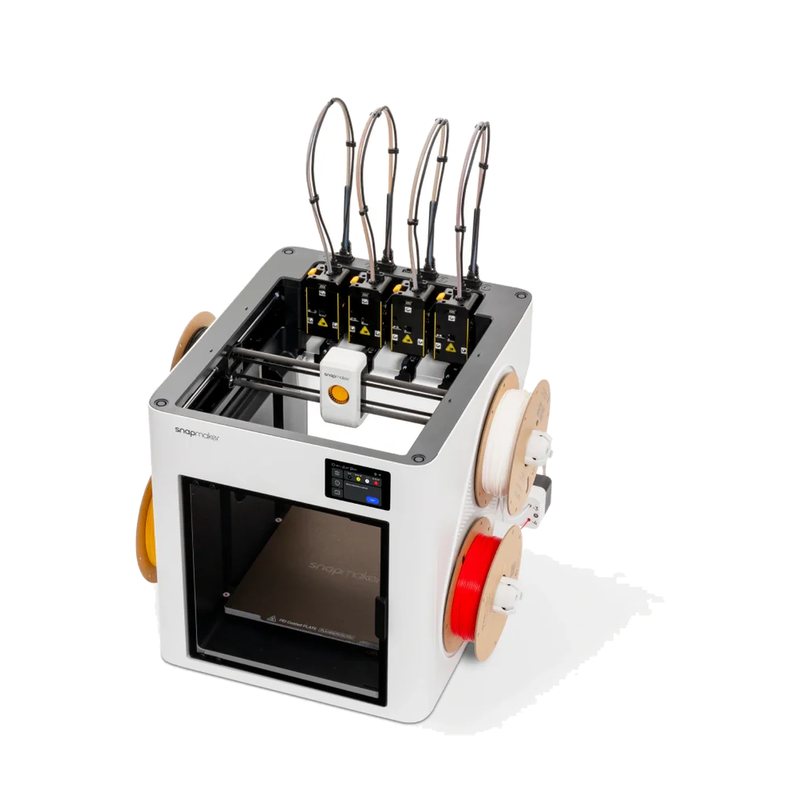
The Snapmaker U1 is a CoreXY toolchanger that ships with four independent toolheads, letting it print up to four colors or materials with much less purge waste than single-nozzle filament changers. It has a 270 mm cubic build volume and a semi-enclosed body, with an optional top cover for ABS and ASA.
9.4from 8 owners · early
9.02 press
The multi-head design is a real leap forward, and the premium-feeling U1 is one of the best choices under $1,000.
Read the full review on GameRevolution · by Mack Ashworth
Not the first multi-head printer, but the smallest, cheapest and most accessible one, fast enough to rank among the best 3D printers available.
Read the full review on TechRadar · by Alastair Jennings
The affordable tool changer the hobby has been waiting for, cutting filament waste while staying fast and simple out of the box. Editor's Choice pick.
Read the full review on Tom's Hardware · by Denise Bertacchi
In this follow-up test with the U1's top cover and hardened nozzles, Keo says it handled abrasive carbon fiber PETG and normal ASA prints very well, but still could not pass his deliberately hard warp test without a dedicated chamber heater. He says he still really likes the printer and that it prints ASA fine as long as the model is not built to trip it up.
Jul 15, 2026 · Sponsored by Snapmaker
Comments (0)
Log in to join the discussion.